From Copy to Images: How Listing AI Doubles New Product Launch Efficiency for Cross-Border Sellers

If you sell in cross-border ecommerce, you have probably been stuck in a familiar loop: a new product goes live, then the system flags the title for "insufficient keyword coverage"; after you finally revise the copy, you realize the product images still do not look professional, so you have to contact a designer or book a photo studio at the last minute, then wait one or two weeks for the visuals; by the time both the copy and images are ready, the best launch window may already be gone.
Listing AI is a Chrome extension built to break that loop. It brings together two tasks that used to be separate and dependent on different people: "copy optimization" and "image generation." It supports five major platforms: Amazon, Newegg, eBay, Walmart, and Mercado Libre. This article looks at its two core features: Listing Optimization and AI Image Set Generation, and shows how much time and cost they can save sellers.
1. Listing Optimization: See the Problems First, Then Fix Them
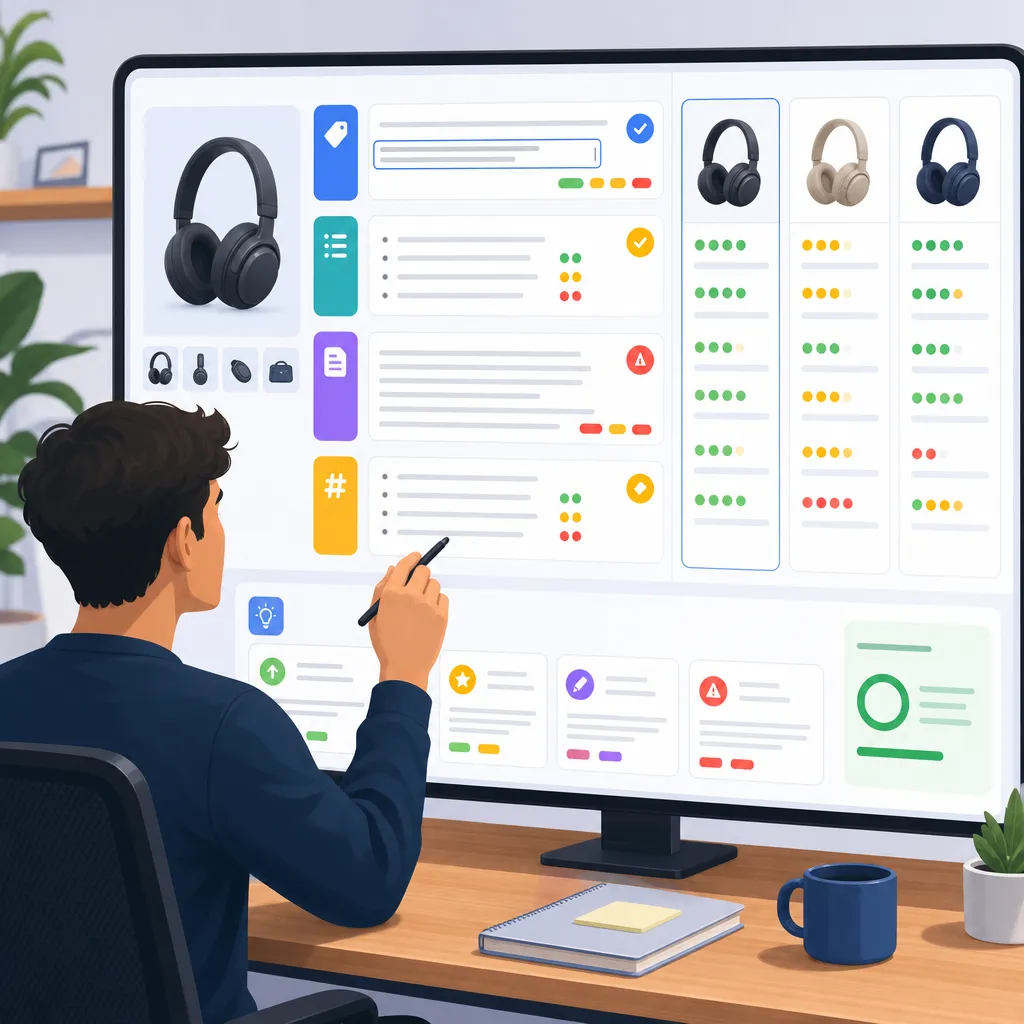
Many sellers edit Listings based on experience and instinct: "this sentence does not sound persuasive enough" or "it seems like there are too few keywords." But instinct can miss issues, and it is hard to measure whether a revision actually improves performance. The optimization feature in Listing AI is built to solve that reliance on guesswork.
Diagnose first, prescribe second
Once you open the extension, AI automatically scans the current product page across the title, bullet points, description, and keywords. It then presents the issues with A/B/C/D ratings, so you can immediately see which parts are weak. Compared with abstract percentage scores, letter grades are easier to read: a C means that section is clearly underperforming, while a D marks an issue that needs urgent attention.
Rewriting is not guesswork. It is evidence-based optimization
After the diagnosis, AI does more than lightly "polish" the copy. Based on keyword gap analysis, it gives concrete rewrite suggestions: which high-conversion terms should be added to the title, how bullet points should be arranged so the strongest advantages appear first, and whether the description feels too flat to persuade buyers. The rewritten suggestions are ready to use, but you can also adjust them manually to keep your brand voice intact.
Competitor insights also support better decisions
Instead of looking only at your own Listing, Listing AI can also analyze competing products. It breaks down strong-performing Listings in the same category, so you are not optimizing in isolation. You get a clear point of comparison that shows what others are doing right.
With this workflow, a Listing diagnosis and rewrite task that might have taken hours, or required hiring a professional operator, can be compressed into a few minutes with an actionable optimization plan.
2. AI Image Set Generation: From One Image to a Full Visual Asset Pack
If copy optimization solves the problem of "saying it clearly," image generation solves the problem of "making it easy to understand and appealing to look at." Product images have long been one of the heaviest cost items for small and mid-sized sellers. Professional studios take time and charge high fees, and large batches of SKUs make visual production even harder to manage.
Listing AI splits this task into two scenarios, each designed for a different practical need.
Single-Product Image Sets: Start with One Image, Generate a Full Set
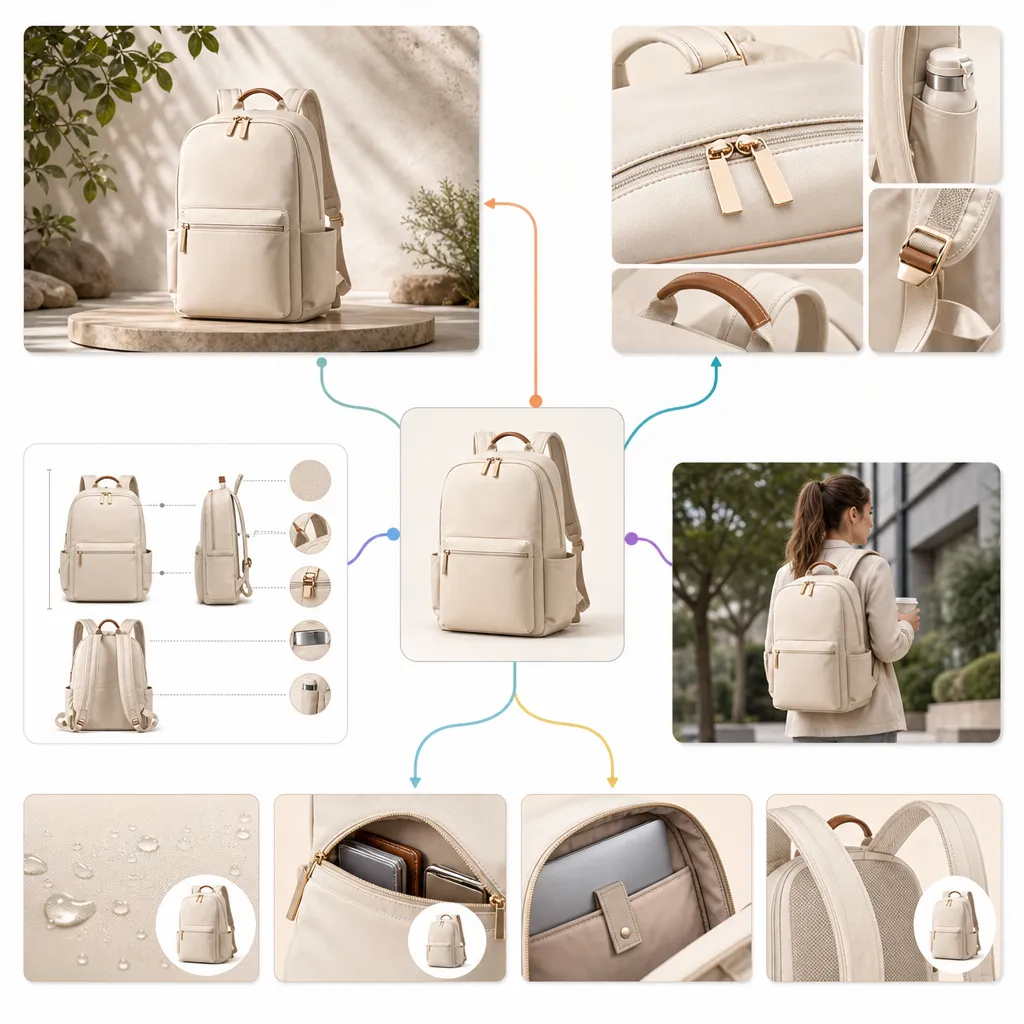
This is the most common use case. A seller selects one product image, either pulled directly from the current product page or uploaded locally, and AI can generate a full set of visual assets within dozens of seconds, including:
- Main image optimization — highlights the product appearance and core selling points more clearly
- Selling point images — combines visuals and text to show differentiated advantages
- Specification images — presents technical specs and comparisons clearly
- Lifestyle scene images — places the product in realistic usage scenarios
- A+ content image sets — directly fits the standard detail page dimensions for channels such as Amazon and Newegg
The number of outputs for each type can be adjusted freely. Sellers can mix and match based on actual needs: "main images only," "A+ only," or both together.
Let AI help choose the style
Image set generation includes 8 preset scene styles, such as fresh minimal, sleek tech, cozy home, and light luxury texture. If you are not sure which style fits your category, you can choose "smart recommendation," and AI will match the most suitable visual direction based on the product category. If you already have something specific in mind, you can also describe the composition in one sentence, such as "no people in the frame, product centered in front view, visual style aligned with North American consumer preferences," and AI will try to incorporate that preference into the generated results.
Your brand elements stay intact
Many sellers worry that AI-generated images will blur brand identity. Listing AI can detect the brand logo on the product page, and once selected, AI keeps the logo's original color and style across all generated images, so the full image set still carries a clear brand signature.
You can keep refining if the result is not right
The generated result is not final. Each image can be retouched individually, the text on the image can be edited, or the whole set can be regenerated until you are satisfied.
Multi-Product Compositions: A New Option for Bundle Sellers
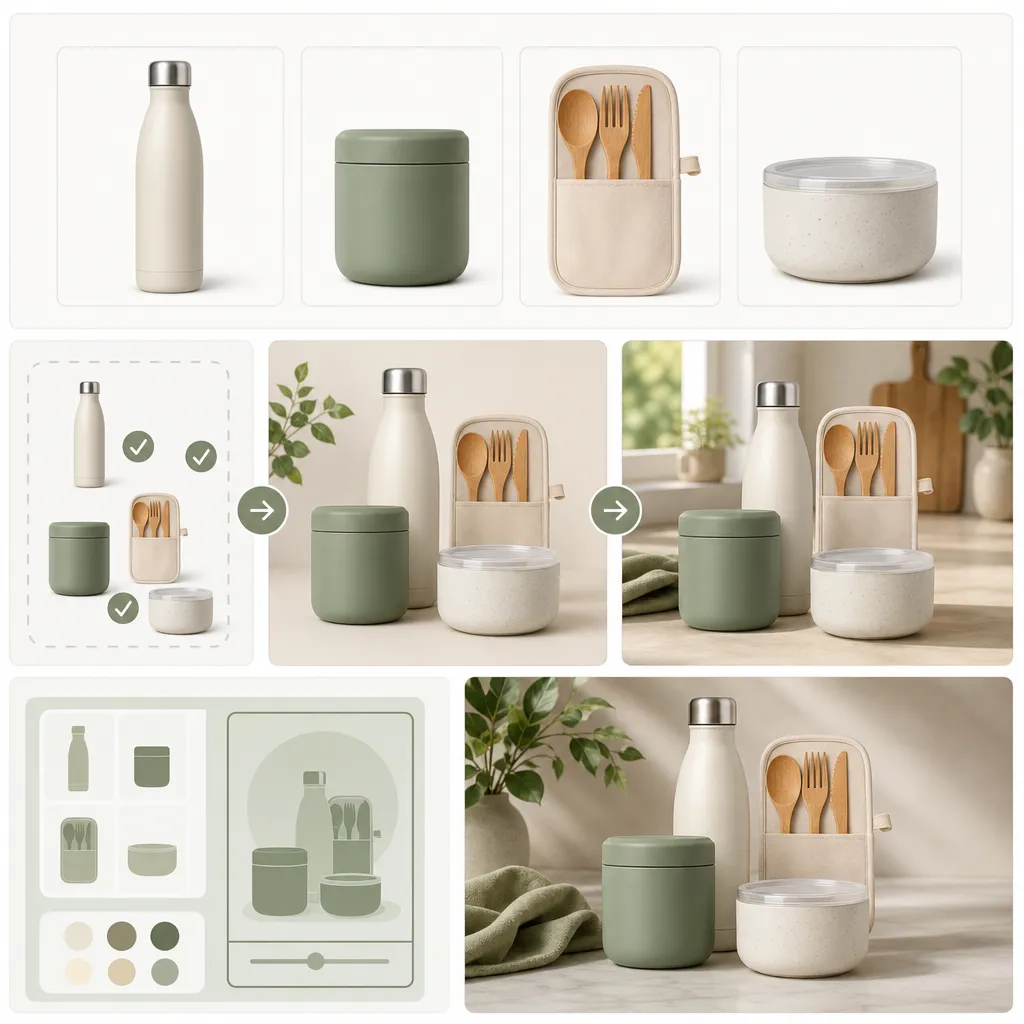
This is a more focused scenario. If your products are sold as sets or bundles, such as cookware sets, beauty gift boxes, or consumer electronics accessory packs, what you often need is not "a full image set for one product," but a presentation where "multiple products appear in the same image."
Listing AI supports combining up to 4 products at once. For each product, you can pull images directly from the current page, paste links to other product pages for automatic image capture, or upload files locally. The workflow stays the same as the single-product mode, so the learning curve is close to zero. After the combination is set, you can assign one product as the visual focal point, then choose:
- Display images — clean backgrounds that emphasize the product arrangement, useful for showing "what is included in this set"
- Lifestyle scene images — places products into realistic usage scenarios, suitable for inspirational or discovery-oriented creative materials
You can set the number of outputs for each type separately, generate A+ content image sets on their own, or create both together. The setup logic fully matches the single-product mode, so switching modes does not mean learning a new workflow from scratch.
3. Free Trial, Ready to Use Anytime
Listing AI offers free trial credits to all users. Once the extension is installed, you can try the full workflow directly without paying upfront. Whether you want to optimize a few Listings first or test whether the AI-generated images are strong enough for your products, you can use the free credits to reach a conclusion before deciding on long-term use.
[Install Extension]
Final Note
Competition in cross-border ecommerce is no longer only about supply chain strength and pricing. The quality of your Listing presentation, whether the copy speaks directly to buyer concerns and whether the images look professional enough to build trust, affects every step of conversion. What Listing AI aims to do is turn this from a long process dependent on outside resources into something you can handle yourself in a few minutes with one extension, leaving more of your time for product selection and operating strategy.
If long launch cycles and a lack of visual materials are slowing you down, try installing Listing AI and run through the full process with the free credits to see how much time it can save.