AI Presales Agent
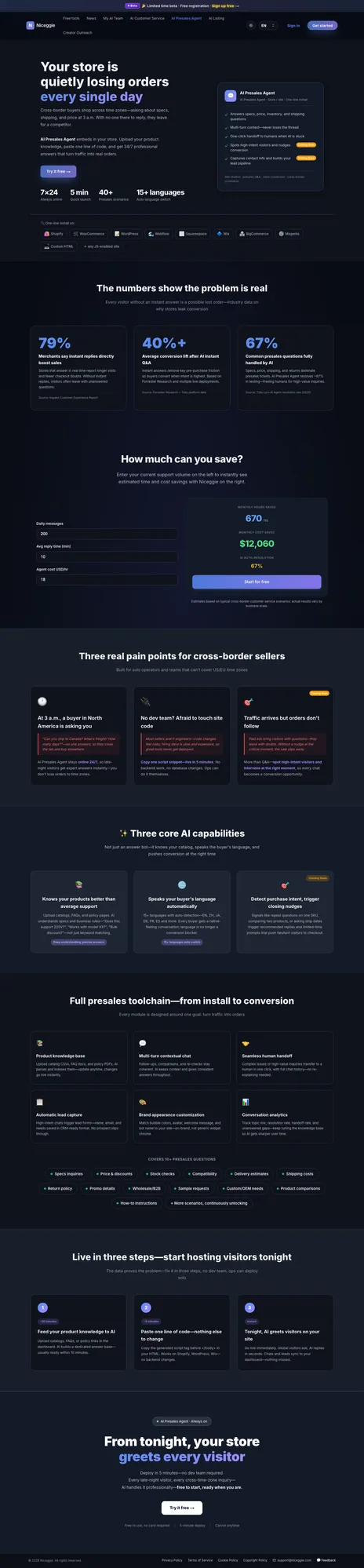
In one line: An AI pre-sales bot embedded in your store / website. 24/7 online, knows your products, speaks the visitor's language, and turns traffic into orders.
30 seconds: a 3 a.m. presales question, answered from your own content
Product demo · 0:32 · English on-screen copy, no narration. AI Presales Agent answers storefront visitors by reading the product spec sheet, checking live inventory and matching your shipping policy; one line of code to install, a knowledge base that indexes itself.
What the video shows (text version)
- 0:00 · A storefront chat at 03:14: a visitor types "Does this ship to Germany before Friday?" and gets no reply. Your best buyer asked at 3 a.m.
- 0:04 · A wall of unanswered chats: questions arrive all day, and your team can't be awake for all of them.
- 0:08 · Figure on screen: 67% of presales questions are answered without a human (source: Tidio, 2025).
- 0:10 · Install: one script tag pasted into index.html before the closing body tag — live, no backend changes — and the chat bubble appears on the storefront.
- 0:14 · The product catalog, spec sheets and shipping policy flow into a knowledge base. Upload what you already have, it indexes itself.
- 0:16 · The agent (online 24/7) answers "Yes — ships to Germany, Wed–Fri" and shows its work: read the product spec sheet (14-page PDF), checked live inventory (42 in stock), matched the shipping policy (DE, 3–5 days).
- 0:20 · Answers in 15+ languages (English, Deutsch, 日本語), detected automatically and replied in kind.
- 0:24 · The rest of the job, handled: human handoff with the full chat history, lead capture formatted for your CRM, analytics on what buyers really ask, and your own bubble, avatar and name.
- 0:28 · Closing title: AI Presales Agent — 24/7, 15+ languages, one line of code.
Key capabilities
| Capability | Description |
|---|---|
| 📚 Knows your products | Upload product catalog, FAQs, policy pages — AI deeply understands specs and business rules |
| 🌐 Auto-switches visitor language | 15+ languages auto-detected, no manual setup |
| 💬 Multi-turn context | Keeps context across follow-ups, comparisons, repeated confirmations |
| 🤝 Seamless handoff to a human | Forwards complex chats to humans, with full conversation context |
| 🎯 Detects purchase intent | Identifies high-intent signals and triggers conversion prompts — 🔜 Coming soon |
| 📋 Lead capture | Auto-organized into CRM format so no prospect slips through — 🔜 Coming soon |
Supported site platforms
One line of code — paste the script before
</body>on your site.
- 🛍️ Shopify
- 🛒 WooCommerce
- 📝 WordPress
- 🌊 Webflow
- ⬜ Squarespace
- 🔷 Wix
- 🏪 BigCommerce
- ⚙️ Magento
- 💻 Custom HTML (any JS-capable site)
Three steps to launch
1️⃣ Upload product knowledge (~10 min)
In your agent console under Manage KB:
- Import from website — point the agent at your site and it ingests the content
- Upload files —
.md,.txt, and.xlsxare supported
AI parses and chunks the documents into your dedicated knowledge base, usually within 10 minutes. The free plan includes 5 knowledge-base documents.
2️⃣ Paste one line of code (~5 min)
Open the Embed code tab, pick your platform (Shopify, WordPress / WooCommerce, Webflow, Wix, or custom site) to see step-by-step install instructions, then copy the generated script tag and paste it before the </body> tag in your site's HTML:
<!-- Illustrative — actual code is generated in your Niceggie dashboard -->
<script src="https://www.niceggie.com/widget/xxxx.js" async></script>
Works directly on Shopify / WordPress / Wix — no backend changes needed.
3️⃣ Live immediately
Deployment takes effect right away. Visitors anywhere in the world get instant answers; transcripts and leads sync to your dashboard.
Your agent console
After signing in, the product page becomes My AI Presales Agents — every account includes 1 free agent with 100 embed replies and 5 knowledge-base documents.
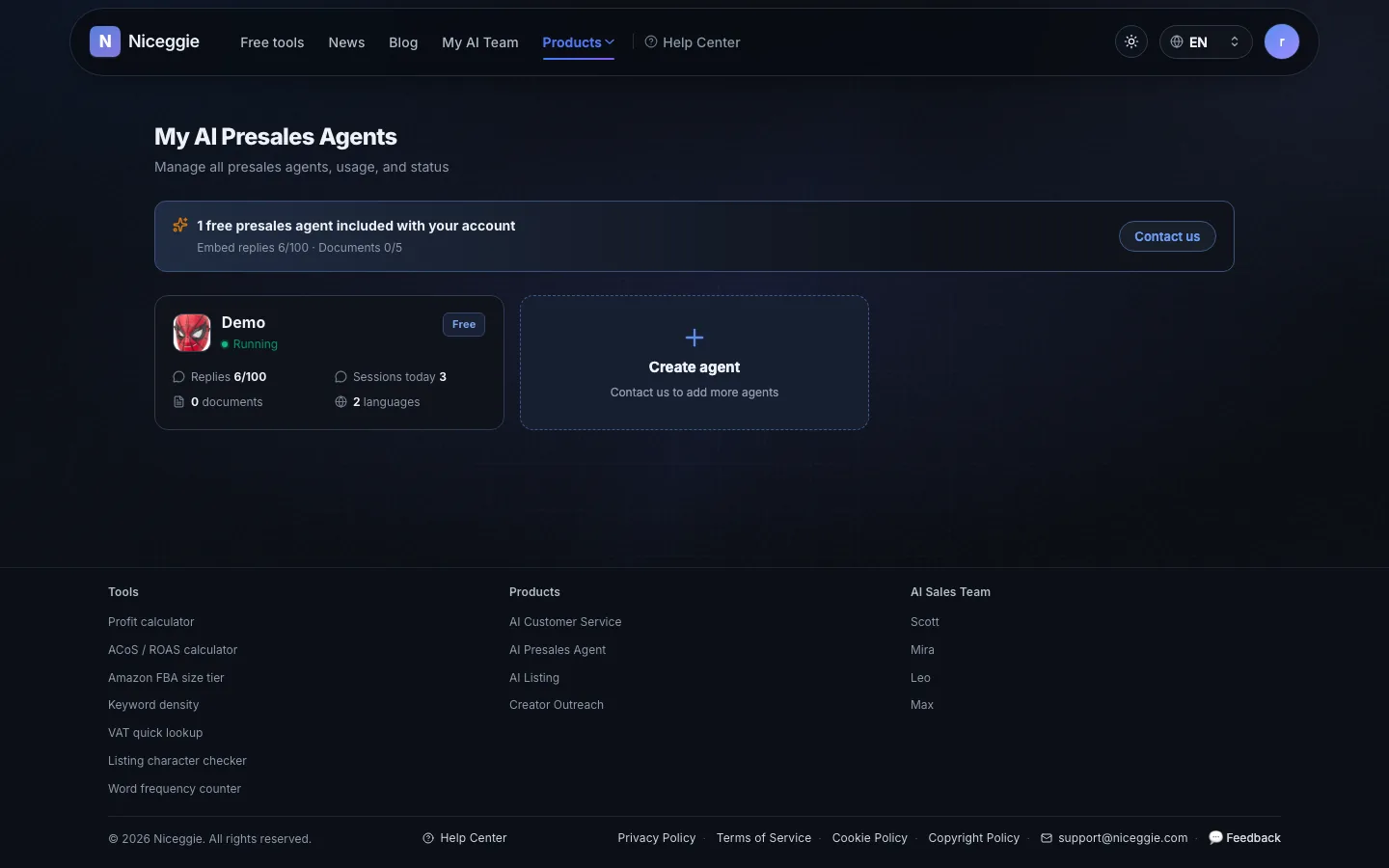
Each agent has its own console:
| Tab | What it does |
|---|---|
| 📊 Overview | Chats today, AI resolution rate, KB documents, visitor languages, recent sessions |
| 🧪 Live tryout | Chat with your agent before embedding it |
| 🔗 Embed code | Per-platform install guides and your copy-paste script (plus a downloadable demo page) |
| 💬 Chat Logs | Full session summaries with conversation history |
| 📚 Manage KB | Import from website or upload .md / .txt / .xlsx; track chunking status |
| ⚙️ Settings | Bot name, UI language, logo (PNG/JPG/WebP/GIF/SVG ≤2MB), welcome message, up to 10 suggested topics with optional random display |
| 🔌 MCP Server | Connect external tools (see below) |
MCP Server: live data in every reply
Connect an MCP (Model Context Protocol) server so the agent can call your inventory, order, shipping, and CRM systems during a chat — answers backed by live data instead of static FAQs.
Visitor asks → agent needs external data → calls your MCP tools → answers with real results.
Configure servers and allowed tools under the "MCP Server" tab in your agent console. Changes apply to all channels immediately — no need to touch your embed snippet.
Presales scenarios covered
Typical presales questions the agent handles, including:
Product specs · Pricing / discounts · Stock status · Compatibility · Shipping ETA · Shipping cost · Return policy · Promotions · Bulk / wholesale · Sample requests · Custom / OEM · Product comparisons · Usage guidance
Reference numbers
- 79% of merchants say instant answers directly improve sales (Kayako)
- 40%+ average conversion lift after deploying AI chat (Forrester + Tidio)
- 67% of common pre-sales questions resolvable fully by AI (Tidio Lyro 2025)
Get started
Free, no card required · ~5 min to deploy · Cancel anytime