Scott · Competitor Specialist
In one line: Competitor just dropped their price and you don't know yet? Tell me who to watch — I'll track them 24/7. Price changes, image swaps, new launches, review shifts: I'll tell you in real time whether to match and how.
Available now
Scott is live now — add him to your team via + Add to my team on the My AI Agents page.
What He Does
Scott is a 24/7 competitor monitor. Hand him a list of rival ASINs (3-5 core competitors recommended) and he tracks:
- Price moves: rival drops or raises price → instant alert + match-or-not recommendation
- Hero image & A+ pages: image swap, new selling point → side-by-side comparison + intent analysis
- New product launches: rival adds a new listing → category, price, key features summary
- Review momentum: rival's last 7-day review volume, rating, and keyword shifts
- Weekly digest: everything competitors did this week + overall competitive temperature
What a Message from Him Looks Like
⚠️ "Competitor B0CXXX just cut price 8%. They're now $12 below you. Suggest matching with a $7 cut and observing for 3 days. They also swapped their hero image and added a '30-day returns' claim — they're pushing harder. You may want to counter with a warranty extension."
Every message has: fact (what they did) + read (what it means) + suggestion (what you can do next). Decisions go in the "Awaiting your call" queue; routine intel goes in the team feed.
Main Deliverables
- Real-time price-drop alerts
- Match-or-not analysis with recommended price
- Hero-image and new-product change alerts
- Weekly competitor digest
How to Use Him
- Add him to your team via + Add to my team on the My AI Agents page.
- Tell him who to watch: in the Niceggie dashboard, add 3-5 core competitor ASINs to Scott's watchlist.
- Set your floor: minimum margin, acceptable price-match range — his recommendations will respect them.
- Check the feed daily: review Scott's updates in the team feed, prioritize the "Awaiting your call" queue.
Inside the Chat Workspace
Once Scott is on your team, open My AI Agents and chat with him directly:
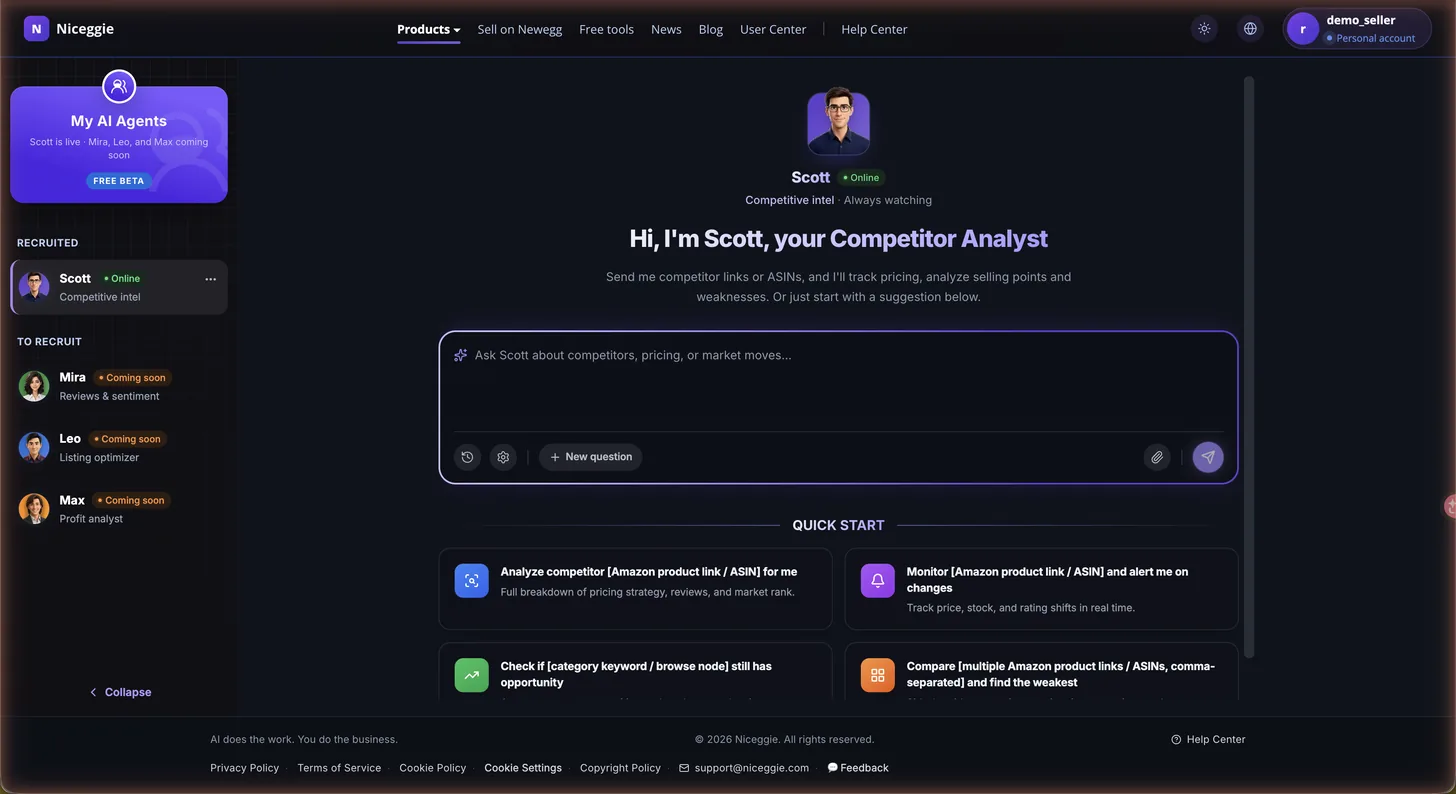
- Chat input — paste a competitor's product link or ASIN and ask
- Quick-start templates:
- Analyze a competitor by product link or ASIN
- Monitor a link or ASIN and alert me on changes
- Check whether a category keyword or browse node still has opportunity
- Compare multiple links or ASINs to find the weakest one
- Session history — every past conversation is saved and searchable
- Settings and file attachments for sharing screenshots or spreadsheets
- New question button to start a fresh thread anytime
Collaboration with the Rest of the Team
- Scott sees a rival added "30-day returns" → Leo evaluates whether to mirror it or differentiate
- Scott detects a competitor price drop → Max instantly calculates the margin impact of matching
- High-frequency negative keyword in a rival's reviews → Mira flags the signal so your product can avoid the same issue
Data Sources & Safety
Scott runs entirely on public product pages and public reviews — no credentials or backend data required.