Listing AI
In one line: Open a product page and Listing AI lists what to improve in the title, bullets and description, with the reason for each. Tick the issues you want fixed and AI rewrites only those parts, keeping the rest of your original — then make a full image set from the new copy. Free Chrome extension; per-listing work drops from 45 minutes to 5 (Newegg internal usage).
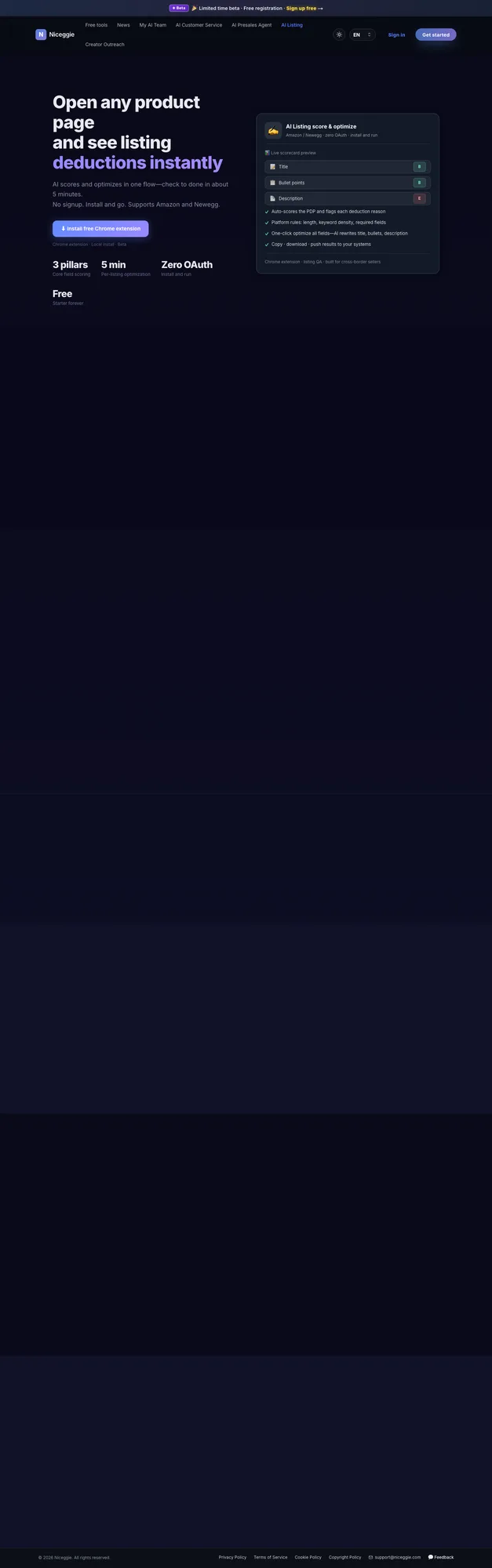
What changed in extension v1.1.0 (October 2026)
- No more A–E grades. The panel now says "N to improve" and lists the issues right in the product card.
- Tick issues to start the rewrite — there is no separate confirmation page, and only the parts you tick change; everything else is marked Unchanged.
- Results open on the panel home screen. You see the clean new copy first; claims that cannot be traced to your original listing are marked orange for you to confirm before publishing.
- Image set right after the rewrite, and up to two products analysed at once.
40 seconds: one listing diagnosed, rewritten, then a full image set
Product demo · 0:40 · English on-screen copy, no narration. The film was shot before v1.1.0 and still shows a score and an A–E grade; the current extension reports "N to improve" instead. The workflow — diagnose, rewrite, image set — is unchanged.
What the video shows (text version)
- 0:00 · Two tools, one workflow. Tool 1, Listing Optimizer: check every field, then rewrite.
- 0:02 · Step 1, product info: paste one product URL, pick the marketplace (Amazon, Newegg, eBay, Walmart, TikTok Shop) and fetch. One product URL, that's the whole setup.
- 0:06 · Step 2, optimization: the listing is checked against platform-specific rules and your target keywords; the score climbs from 45 to 99.
- 0:10 · Step 3, results, before and after. Before (grade D): "Rosewill RHAI-13001 1800W Induction Cooktop Double Burner Electric Stove Hot Plate Black", with bullets like "Easy to use". After (grade A): "Rosewill 1800W Foldable Dual Induction Cooktop | 2 Independent Zones | Touch Control | 8 Preset Programs", with bullets such as "1800W total — cook 2 dishes at once".
- 0:16 · Time per listing: 45 minutes before, 5 minutes now (Newegg internal usage, directional figure).
- 0:18 · Tool 2, Product Image Suite: pick a photo (one white sneaker shot), pick the set, pick the style.
- 0:26 · Step 4, results: six marketplace-ready images in one batch, from a plain white-background shot to a lifestyle scene.
- 0:30 · Both tools work on Newegg, Amazon, eBay, Walmart and TikTok Shop today, with more marketplaces rolling out.
- 0:34 · Why it matters (illustrative chart): orders per week flat before optimization, rising after. Actual results vary by category, platform and starting listing quality.
Supported marketplaces
- ✅ Amazon (US)
- ✅ Newegg
- ✅ eBay
- ✅ Walmart
- ✅ Mercado Libre — every Latin American site, including Mercado Livre in Brazil; the rewrite is written in the site's own language (Spanish or Portuguese) and kept consistent with the technical specifications (ficha técnica)
- ✅ TikTok Shop
In development: 🔜 Shopify · + more
Shopify waitlist
Join the Shopify waitlist from the "Join waitlist" link on the product page.
Extension or web app
| Entry point | What it does |
|---|---|
| 🧩 Chrome extension | Diagnose and rewrite a listing that is already live, straight on its product page; build an image set from the photos on that page; capture the page's gallery and A+ images |
| 🌐 Web app (no install) | Write a new listing from scratch, generate AI images from a photo you upload, and manage products, media, Webhook and quotas in the console |
Diagnosing a live listing needs the extension for now. The account and quotas are shared between both.
No connection to start
Neither mode calls platform APIs, connects your store, or asks for your account password — to the platform it looks the same as you browsing and editing pages by hand. Store authorization is only needed if you later turn on Store sync (below), and you can disconnect it anytime from Authorization Management.
What it checks
| Field | What's diagnosed |
|---|---|
| 📝 Title | Length limits, keyword coverage, platform conventions |
| 📋 Bullet points / highlights | Structure, keyword distribution, value proposition |
| 📄 Description | Length, readability, keyword density |
| 🔗 Consistency | Whether the title, bullets, description and specifications agree with each other |
Each issue comes with its reason and how to fix it. Marketplace field and length rules are built in, so you don't have to look them up.
Steps
1️⃣ Install the extension
Chrome Web Store · Free · No store connection
- Open the product page and click "Install free Chrome extension" — one click in the Chrome Web Store, about 30 seconds.
- The extension then opens a three-step getting-started guide: pin the extension (recommended, so the icon stays in the toolbar), open one of your product pages (paste a product URL or an Amazon ASIN, or try a sample), and pick a feature — Listing diagnosis, AI Images or Image capture.
Chrome Web Store unreachable?
Use "Download offline package" on the product page: turn on Developer mode on your browser's Extensions page, then drag the downloaded .zip onto it — no unzipping needed.
2️⃣ Open a product page and start the diagnosis
On a product page of any supported marketplace, an entry bar appears under the title and the panel opens from the Listing AI icon.
- Quick check, no sign-in needed: the panel first shows the basics it can read from the page — whether the title length is right and, on Amazon, how many bullet points there are and whether the text description is complete. This reads only what is already on the page and uses no quota.
- Click "Start analysis" and sign in with a free account. The checklist ticks off item by item while AI reads the content.
- The product card then reports "N to improve" and lists each issue in order — title → highlights → bullets → description — with its reason. Missing content is marked separately.
3️⃣ Tick the issues and rewrite
- Tick the issues you want fixed; the button tells you how many credits the rewrite uses. Only the parts with ticked issues are rewritten; the rest keeps your original text and shows as Unchanged in the result. To change another part, tick an issue there too.
- Want your own search terms in? Use "Add keywords and rewrite": it suggests up to eight keywords from the diagnosis (brand words and words already in your copy are left out), and you can add your own.
4️⃣ Check before publishing
The result opens on the panel home screen:
- Clean new copy first. Switch each field between the new copy and Compare to see the original and the rewrite paired line by line.
- Check before publishing: numbers, specs, certifications, warranties and similar claims are traced back to your original listing one by one. Anything without a source is marked orange — click "Accurate" to keep it or "Edit" to change it, so you never overstate.
- "Why these edits": one line per change says what it is based on and why.
- Not happy? "Re-run diagnosis and optimize" or add keywords and rewrite again.
5️⃣ Export and apply
| Output | How |
|---|---|
| 📋 Copy | Copy all listing text, or copy field by field |
| ⬇️ Download | Download listing text or the diagnostic report from the ··· menu on the product card |
| 🔗 Webhook push | Send the result to your ERP / PIM or any HTTPS endpoint configured in the console — no manual paste |
Paste the copy into your seller back office yourself — nothing is written to the marketplace without you (see Store sync below).
6️⃣ Next: images from the new copy
Once the rewrite is done, the bottom of the panel offers "Next: make an image set from this copy" — the images follow your rewritten text. "Capture page images" sits in the ··· menu on the product card. Before a rewrite, both entries sit below the product card.
Several products at once
Start a diagnosis or rewrite, switch to another product page, and start the next one — the work keeps going in the background:
- Up to 2 products run at the same time; the rest wait in line. The same product is never submitted twice.
- Progress shows on each product page's entry bar, on the panel home screen (with a task list for the other products), and as a badge on the extension icon.
- After a rewrite, the entry on the product page tells you what is left for that listing: claims to check, how many spots still to improve, or not published yet.
AI image suite
Generate ready-to-list visuals from the product's own photo — see the AI Image Suite page for the full guide. In the extension:
- 🖼️ Seven image types: main, feature, detail, spec, size, lifestyle and A+ content images; generate just the product set, just the A+ set, or everything
- ✦ A+ images: Standard A+, Premium A+ and mobile A+, split automatically into upload-ready sizes; delete a module you don't want and the rest restitch themselves
- 🖌️ Local refine: mark the area to change and describe it in one sentence; every version is saved, and undo or going back to any version costs no quota
- 🌐 Image text translation: the text on an image is detected and replaced with the target language, so one set serves several markets
- 🔎 Side-by-side review: original and generated images zoomed next to each other before you publish
- 🏷️ AI-generated people disclosure: images containing an AI-generated person can be tagged contains-synthetic-performer per image, to meet Amazon's disclosure requirement
- 📁 Sources: pick product images and your brand logo straight from the page, upload them, or reuse images saved in your cloud library
Separate quota
The image suite uses its own quota (60 images every 30 days on the free plan), independent of diagnoses and rewrites.
Image capture
Capture page images extracts the product gallery and A+ images on the current page in one click; stitched A+ images are merged into single images automatically. Download them, or save them to your cloud library organised by product and pick from it when making image sets.
Real numbers
From Newegg's own internal usage:
- 45 min → 5 min per listing — checking length, banned terms, keyword density and completeness by hand took about 45 minutes on a single SKU; diagnosis plus a ticked rewrite brings it to about 5
- 6 marketplaces live — Amazon, Newegg, eBay, Walmart, Mercado Libre, TikTok Shop
Store sync (coming soon)
Today the product diagnoses your listing and rewrites it; you apply the result yourself. Store sync will let AI-optimized results publish straight back to your channels over each channel's official API:
- First wave: Amazon, Newegg, eBay — more channels to follow, with no committed launch date yet
- Every publish still needs your confirmation — nothing is written to a channel silently or automatically
- Requires completing store authorization, which you can disconnect at any time
Request early access from the "Contact Us" form on the product page (choose Store sync early access).
Signed in: the web console
Signing in on the product page opens the Listing AI console:
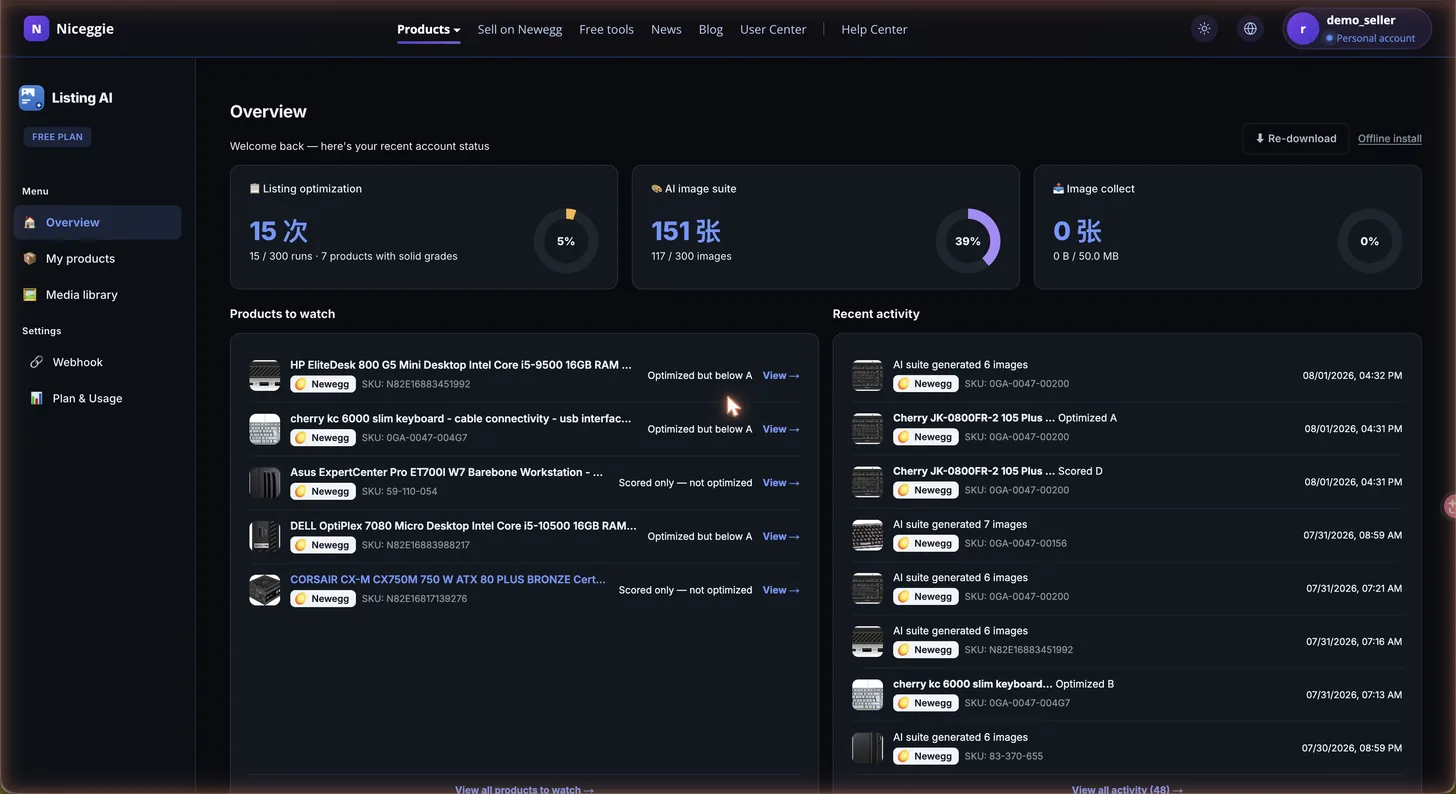
- 📊 Overview — three independent quota cards (AI diagnoses & rewrites, AI image suite, image storage), a products to watch list (diagnosed but not optimized yet, optimized with room left, or no activity for 14 days) and a recent-activity feed
- 📦 My products — card or list view; filter by platform and status (Diagnosed / Optimized); search by name or SKU; each product shows its media count. Products you diagnose in the extension appear here automatically
- 🎨 Media library — AI-generated and captured images in one place; filter by source and image type; batch-select for bulk actions
- 🔗 Webhook — configure an HTTPS endpoint plus a custom header name/value, reference the Schema V2 payload format, and test the connection; the extension's Push button sends results here
- 💳 Plan & Usage — the three quotas tracked independently on a 30-day rolling window, plus an upgrade entry
- ⬇️ Re-download the extension anytime
Free plan and quotas
- 30 AI credits every 30 days, shared by diagnoses and rewrites — re-opening a listing you already diagnosed is free
- 60 AI images every 30 days for the image suite
- Quotas refill on a rolling 30-day window; when you run out, the notice shows the exact reset date
- Need more? Tap "Request more quota" in the extension or the console, or ask about Pro / Custom through the "Contact Us" form on the product page
Do I have to install the extension?
Diagnosing and rewriting a listing that's already live needs the extension for now: install it, then open the product page. Without it, you can sign in to the web app to write a new product listing from scratch and generate AI images.
Do I need to connect my store or account?
Not by default. Whether you use the extension or the web app, diagnosis and rewriting work with no API authorization, no store connection and no account password. Only the upcoming Store sync will need a store connection in Authorization Management, and you can disconnect it at any time.
Will it change my listing automatically?
No unconfirmed change is ever made. Without Store sync, the product only diagnoses your listing and rewrites the copy — you review it and submit it to the marketplace yourself. With Store sync, each update will likewise need your confirmation before it is written back.
What happens to the parts I didn't tick?
They keep your original text and show as Unchanged in the result — no comparison, no edit note. To rewrite another part, tick an issue in that part and run the rewrite again.
Why are some sentences in the new copy orange?
Those are claims — numbers, specs, certifications, warranties — that could not be traced to your original listing. Click Accurate if the claim is true, or Edit to change it, before you publish.